Loading... 利用localstorage实现的一个简单的本地增删网站功能,适用于钻芒二开版typecho webstack导航 无需登录即可实现前台增加删除链接,缺点是只能本地保存,换电脑或者清理缓存后会消失 效果如下图所示 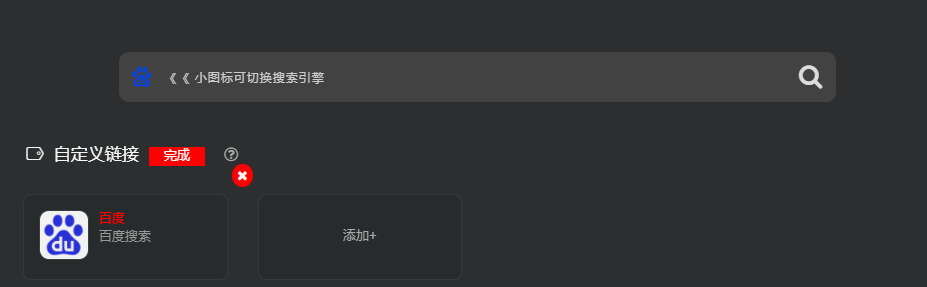 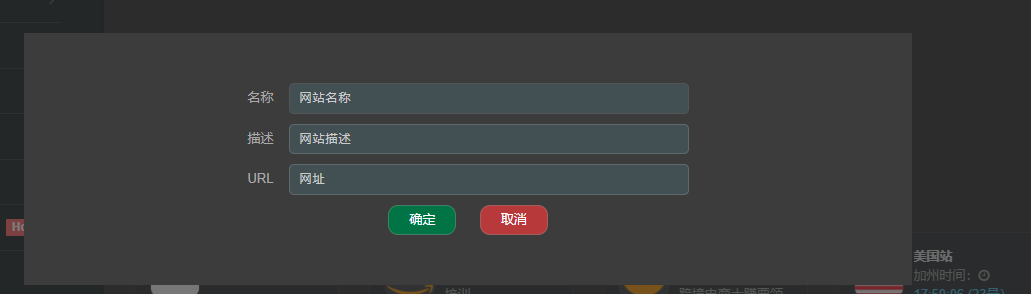 网站demo:[静谧时光导航](https://i.silencetime.com) ### 关键代码 ##### CSS ```css #edit-panel { position: absolute; top: 0; width: 100%; height: 100%; background: #2c2c2c9e; z-index: 999; } .main-panel { display: flex; justify-content: center; align-items: center; flex-direction: column; margin: 200px; padding: 50px 100px; background: #3c3c3c; } #err { padding: 10px 15px; margin-top: 10px; background: #b522222e; color: #ff6464; display: none } #name, #des, #url { margin-left: 15px; padding: 5px 10px; background: #48626a7d; border: 1px solid #ffffff26; border-radius: 5px; margin-bottom: 10px; min-width: 400px } #submit,#cancel { color: #fff; border: 1px solid #8b8b8b75; padding: 5px 20px; margin: 0 10px; border-radius: 10px; } #submit { background: #007444; } #cancel { background: #b73939 } .link-header { display: flex; justify-content: left; align-items: center; } .edit button { border: none; padding: 0 15px; background: red; color: #fff; margin: 0 10px; } .edit span { font-size: 1.2em; padding: 0 5px; } .fa-remove { position: absolute; right: -10px; top: -10px; background: red; color: #fff; padding: 5px; border-radius: 50%; z-index: 9999; display: none; cursor: pointer } .add { display: flex; justify-content: center; /* align-content: center; */ align-items: center; } @media (max-width: 600px) { .main-panel { margin: 15px; padding: 100px 20px } #name, #des, #url { min-width: 250px; } } ``` ##### HTML ```html <!--增加本地自定义导航--> <div class="link-header"> <h4 class="text-gray"><i class="linecons-tag" style="margin-right: 7px;" id="custom-link"></i>自定义链接</h4> <div class="edit"> <button id="edit">编辑</button> <button id="onedit" style="display:none">完成</button><span> <i class="fa fa-question-circle-o" data-toggle="hover" data-trigger="hover" data-placement="right" title="" data-content="你可以在这里添加自己的链接,数据存储于本地,不上传服务器,可放隐私。"></i></span> </div> </div> <div class="customlink"> <div class="row"> <div id="customLinks"></div> <div class="col-sm-3" id="add" style="display: none;"> <div class="xe-widget xe-conversations box2 label-info add">添加+</div> </div> </div> </div> ``` ##### JS <div class="hideContent">此处内容需要评论回复后(审核通过)方可阅读。</div> 最后修改:2021 年 11 月 24 日 © 允许规范转载 打赏 赞赏作者 支付宝 赞 0 如果觉得我的文章对你有用,请随意赞赏